
In short
1. Your platform does the selling: catalogue, checkout, payment, shipping. For most stores that part is solved.
2. An ERP runs what sits behind it: stock, purchasing, accounting, branches and wholesale.
3. The trigger is not a revenue figure. It is the moment the platform dashboard stops being the single source of truth.
4. The clearest signals: more than one warehouse or branch, more than one sales channel, wholesale on credit terms, or a monthly close that takes days.
5. Keep your store on its platform. Replacing it with an ERP web shop is the most common mistake in these projects, and the most expensive.
If you sell online in Saudi Arabia, the selling part is solved. The platform takes the order, collects the payment and hands the shipment to a courier.
What it does not do is run the rest of the business: the warehouse, the purchasing, the accounting, the second branch, the wholesale customers. That is the job of an ERP.
This guide is for merchants already selling online in the Kingdom who are deciding two things: whether the business needs an ERP yet, and which system fits a Saudi store rather than a European factory.
What is an ERP?
An ERP (enterprise resource planning system) is one database with a set of connected applications on top, running a company's core operations: sales, inventory, purchasing and accounting, and often manufacturing, point of sale and HR. For an online store it sits behind the storefront. The store sells; the ERP records the sale, moves the stock, pays the supplier, issues the tax invoice and reports the numbers.
One phrase in that definition does the work: one database. One product record, one stock count, one customer, one invoice. Everything else in this guide follows from a single question. Does your business still fit inside one platform dashboard, or has it spread into spreadsheets and a second system?
What is the difference between an ERP, accounting software and a POS system?
Accounting software records money. A POS system records sales at a counter. An ERP records the operations that produce the money as well, such as stock movements, purchase orders, manufacturing, deliveries and customers, and then does the accounting on top in the same database. Accounting software is one application inside an ERP, and a POS is another.
ToolWhat it is forWhat it cannot doAccounting software (Qoyod, Daftra, Wafeq and similar)Books, VAT, e-invoices, financial reportsRun a warehouse by lot or location, plan purchasing, cost a manufactured product, manage branches as one operationPOS system (Foodics, Marn and similar)Selling at the counter, tables, cashier shifts, receiptsAccounting beyond a daily summary, supplier management, multi-channel stock, wholesaleERP (Odoo, SAP Business One, Dynamics 365 Business Central and similar)Everything above in one database, plus purchasing, inventory, manufacturing, CRM and HRReplace your storefront. It should not try to.
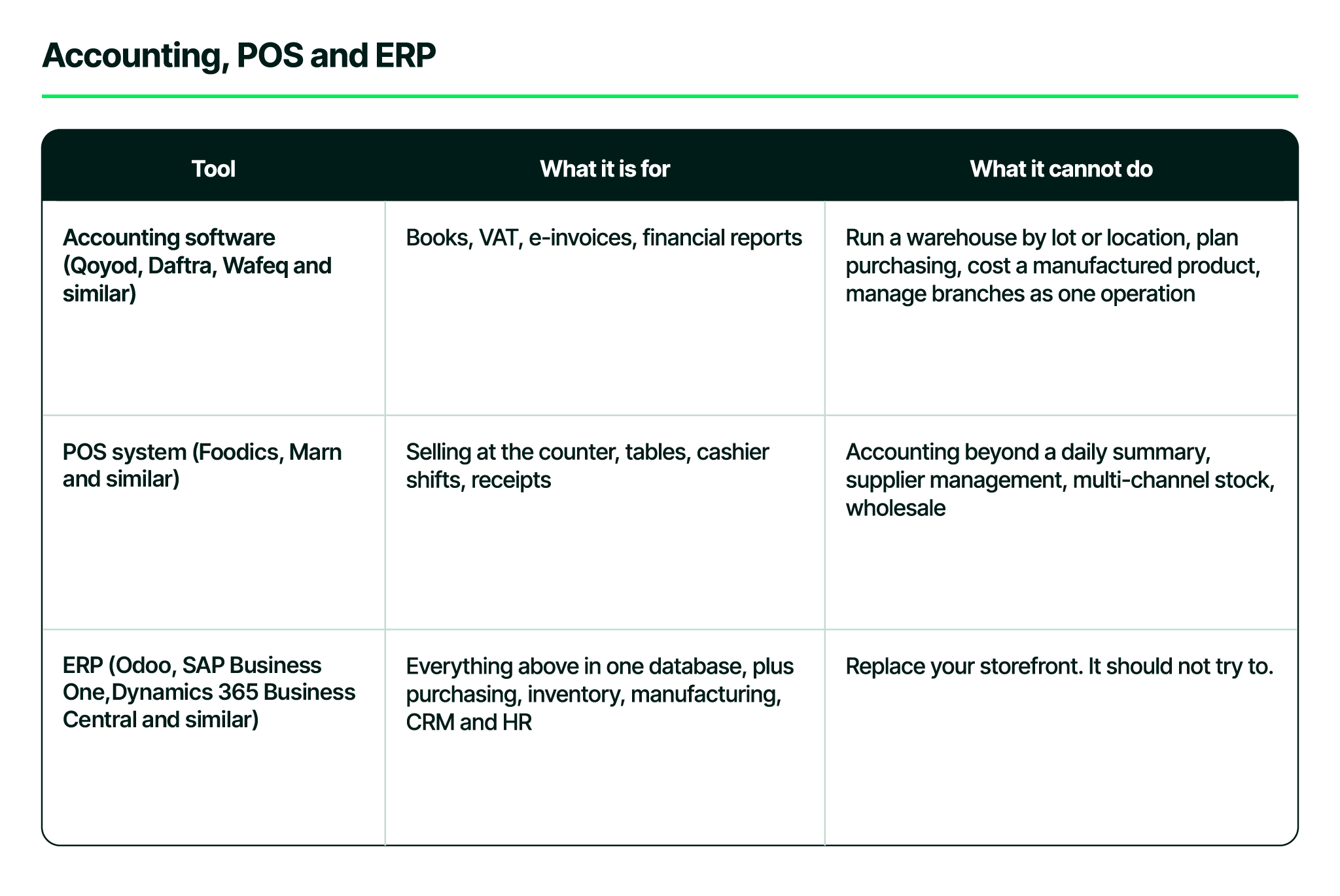
The last cell is the point of this whole guide. The best setup for a Saudi online store is not an ERP with a built-in web shop. It is the platform the market already uses, connected to an ERP that runs everything behind it. The full comparison of ERP against accounting software is in a separate article.
Does your store need an ERP? Seven signals
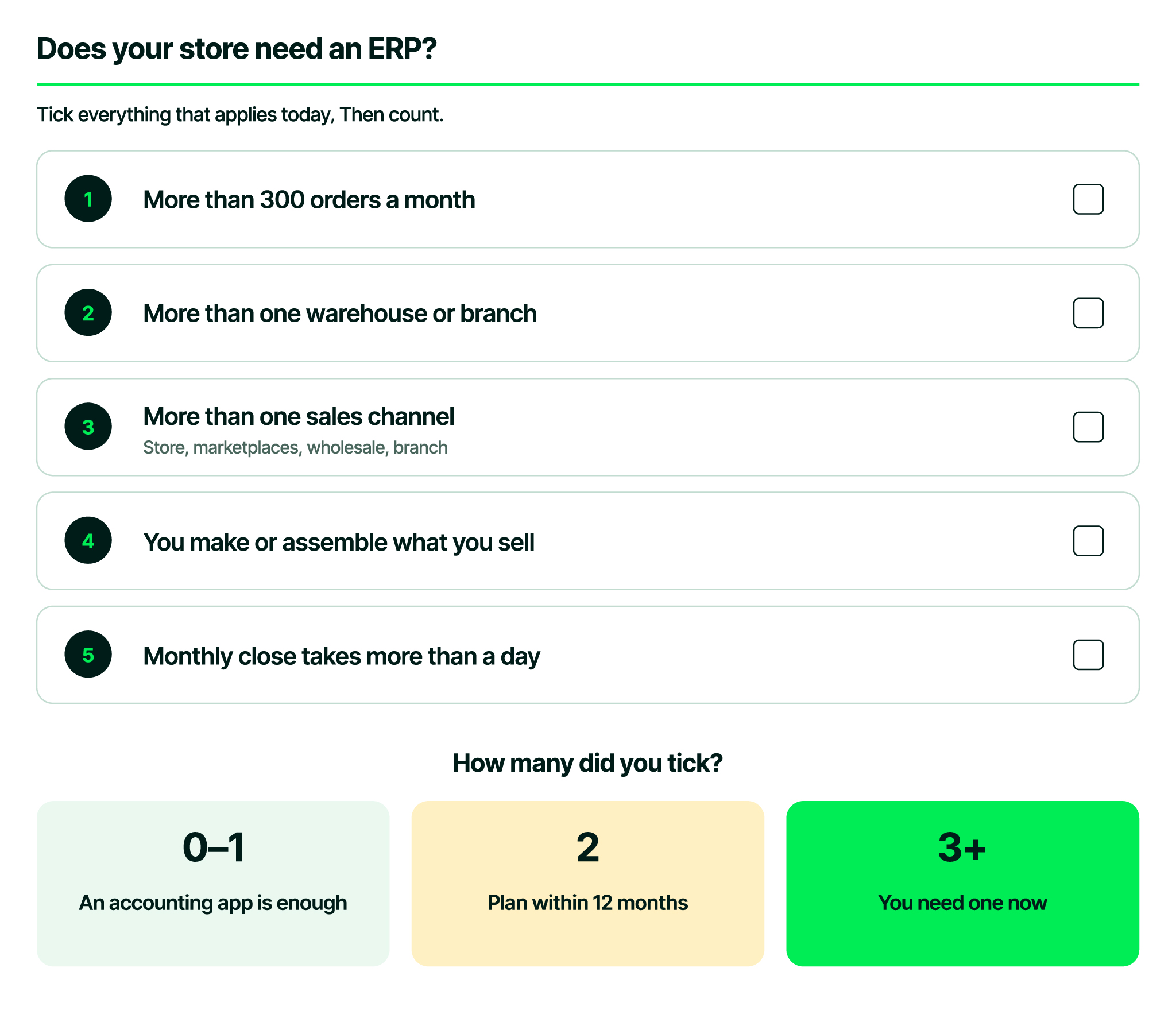
Your online store needs an ERP when the platform dashboard stops being the single source of truth. In practice that happens once you cross more than one of these lines: over 300 orders a month, more than one warehouse or branch, more than one sales channel, more than 500 active products, wholesale customers on credit terms, products you make or assemble yourself, or a monthly close that takes days instead of hours.
Methodology: these thresholds come from Naqlah's ERP implementations with Saudi online stores, not from published research. They are indicators, not rules. One store crosses a line comfortably while another struggles below it.
- Stock is wrong somewhere. The store shows a product in stock, the warehouse says otherwise, and someone is refunding an order that should never have been accepted.
- The team enters data twice. Orders are exported from the platform and typed into the accounting system, or the accountant rebuilds the month from a bank statement.
- 'What did we make on this product' needs a spreadsheet, because cost lives in one place and revenue in another.
- Purchasing runs on memory. Reordering happens when someone notices an empty shelf, not because the system knows sales velocity and supplier lead time.
- A second location appeared: a branch, a second warehouse, a fulfilment partner or a pop-up. Stock now moves between places and has to be counted in each.
- Wholesale started. A cafe or a distributor wants your product on its own price list, on credit terms, with a monthly statement, and the store checkout cannot do that.
- Compliance is manual. E-invoices come out of one system while orders live in another, and reconciling them is somebody's job.
A real example
Barlina, a Saudi fashion brand selling on Zid with its own factory and warehouses, spent three working days at every month end processing orders by hand, and synced once a month. After connecting the store to Odoo, an order or product reaches the system in under 90 seconds, at a peak of 2,500 orders a day across more than 5,000 products. Read the Barlina case study.
When you do not need one yet
An ERP is the wrong purchase for a store still finding its product. If you sell under a hundred products from one location, ship a few hundred orders a month, and one person can close the books in an afternoon using an accounting app already connected to your platform, keep that setup. The platform's accounting and e-invoicing apps are good, and an ERP at this stage adds process before there is anything to process.
The signal to watch is not revenue. It is the number of places the same fact lives. The day a single product's stock count exists in three systems is the day to start planning.
How do you choose an ERP in Saudi Arabia? Eight criteria
For a Saudi online store, two of the eight criteria eliminate most of the market before you compare anything else: a maintained connector for the platform you sell on, supported by a local partner, and e-invoicing built into the system rather than added by a third party. The other six are Arabic interface depth, inventory depth, multi-channel stock, Saudi-ready accounting, a local partner with references in your sector, and room to grow without re-implementing.
Generic ERP checklists are written for a factory in Germany. A Saudi online store has a shorter and more specific list.
- A maintained connector for the platform you already sell on. Not 'an API is available'. A maintained app or integration that a partner inside Saudi Arabia supports after go-live.
- E-invoicing built in, with both the clearance and reporting flows, not a bolt-on from a third party.
- Arabic across the whole system, including the reports your accountant will print, not only the login screen.
- Inventory depth: locations, lots or serial numbers, expiry dates, transfers between branches and cycle counts. Fashion needs variants, food needs expiry dates, coffee needs roast dates.
- Multi-channel by design: one stock pool serving your own store, the branch POS, the marketplaces you list on (Amazon, noon) and wholesale, with rules for which channel gets the last unit.
- Accounting a Saudi accountant recognises: VAT returns, withholding, multi-company if you hold more than one commercial registration, and the chart of accounts they expect.
- A local implementation partner with references in your sector, because the system is half of the outcome and the partner is the other half.
- Room to grow without re-implementing: manufacturing, HR and payroll, a second company or a second country should be applications you switch on, not a new migration.
Why criterion 2 is no longer optional
In July 2026 ZATCA announced Wave 25 of Phase 2 e-invoicing, halving the threshold to SAR 187,500 of annual revenue in any year from 2022 to 2025, with an integration deadline of 1 February 2027. ZATCA notifies each group at least six months ahead. At that threshold nearly every active online store in the Kingdom is inside the clearance model rather than outside it. Check your own wave and deadline on the ZATCA e-invoicing pages, and see our Phase 2 guide for what integration involves.
A fair comparison: Odoo, SAP Business One, Dynamics 365 Business Central, Zoho, NetSuite and local platforms
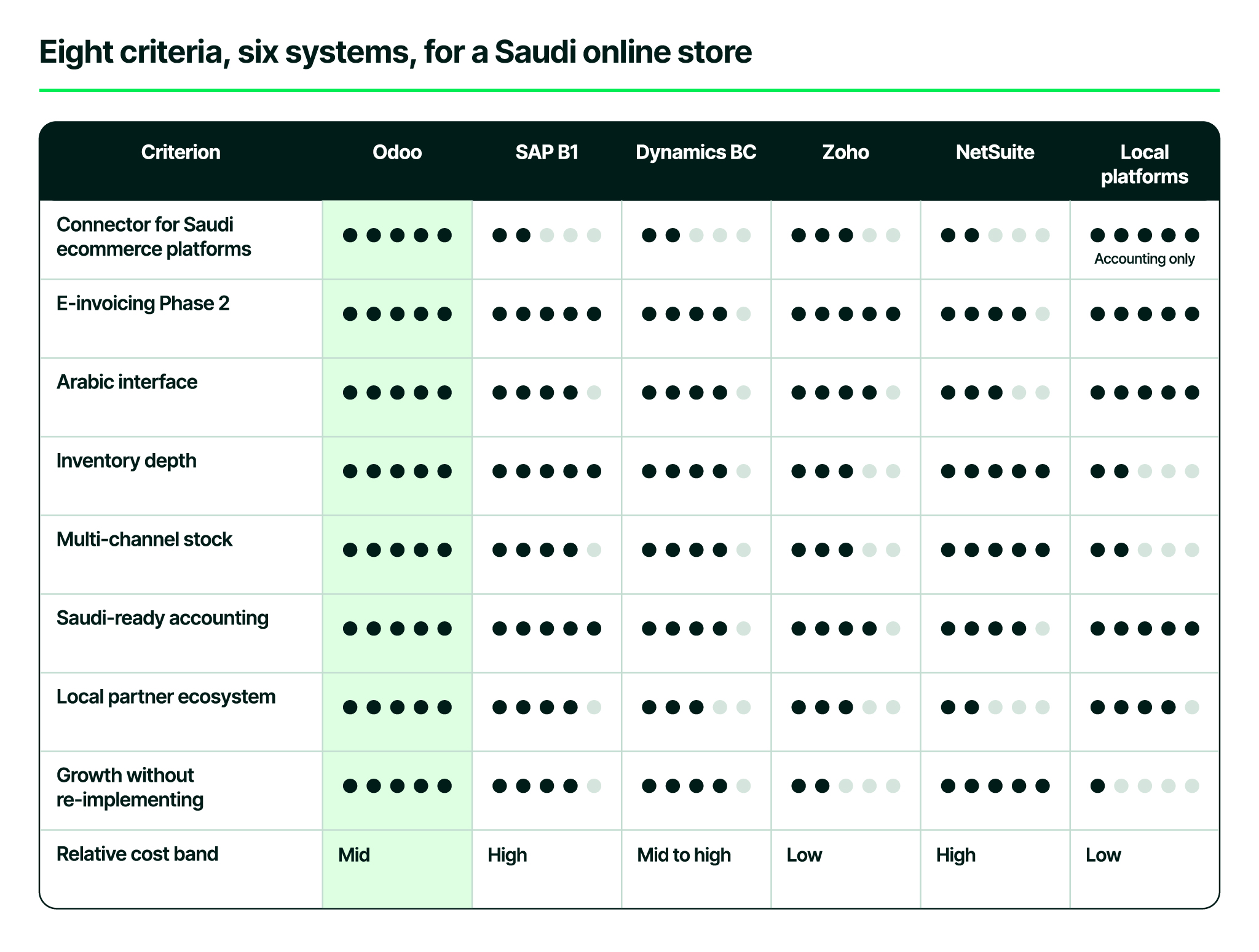
Every system here can run a business. The question is which one runs a Saudi online store with the least custom work. The scores are Naqlah's assessment against the eight criteria, drawn from implementation experience in the Kingdom rather than vendor claims. They shift as vendors release features, and we revisit the table when they do.
CriterionOdooSAP B1Dynamics BCZohoNetSuiteLocal platformsConnector for Saudi ecommerce platforms522325 (accounting only)E-invoicing Phase 2544545Arabic interface544435Inventory depth554352Multi-channel stock544352Saudi-ready accounting554445Local partner ecosystem543324Growth without re-implementing544251Relative cost bandMidHighMid to highLowHighLow
Assessment by Naqlah Technologies, September 2026, based on the current release of each system and its Saudi localisation. The Odoo assessment refers to Odoo 19, the current release. Scores reflect out-of-the-box fit for a Saudi online store, not overall product quality. The first two rows are checked against each vendor's published integrations and e-invoicing documentation; the rest reflect implementation experience in the Kingdom.
Why does Odoo come out ahead for Saudi online stores?
Odoo leads for three reasons: it has maintained connectors for the platforms Saudi merchants sell on, supported by local partners; its applications switch on one at a time in the same database as the store grows into POS or manufacturing; and its Saudi localisation and Odoo-certified partner ecosystem are mature. It is not the right answer for every company, and the limits are below.
First, the connector is a product, not a project. The single biggest risk in an eCommerce ERP project is a custom integration that nobody maintains after go-live. Odoo has maintained connectors for the platforms Saudi merchants sell on: Naqlah's Saella integration app installs from the Salla app store, and Naqlah's Zid integration runs the same syncs for Zid stores.
Second, it grows the way stores actually grow. A store starts with Sales, Inventory and Accounting. A year later it adds POS for a showroom, then Manufacturing when it starts producing its own line, then HR when the team passes twenty people. Each is an application switched on in the same database, with the same product and customer records.
Third, the Saudi localisation and the partner ecosystem are mature: Phase 2 e-invoicing, Arabic right to left across every screen and report, Saudi payroll rules, and dozens of Odoo-certified partners competing on service rather than on access.
Where Odoo is not the answer: a group with heavy treasury and consolidation needs across many legal entities will find SAP Business One or NetSuite more at home, and a store that only needs books and e-invoices should stay on a local accounting platform until it reaches the signals above.
What determines the cost, and how long does implementation take?
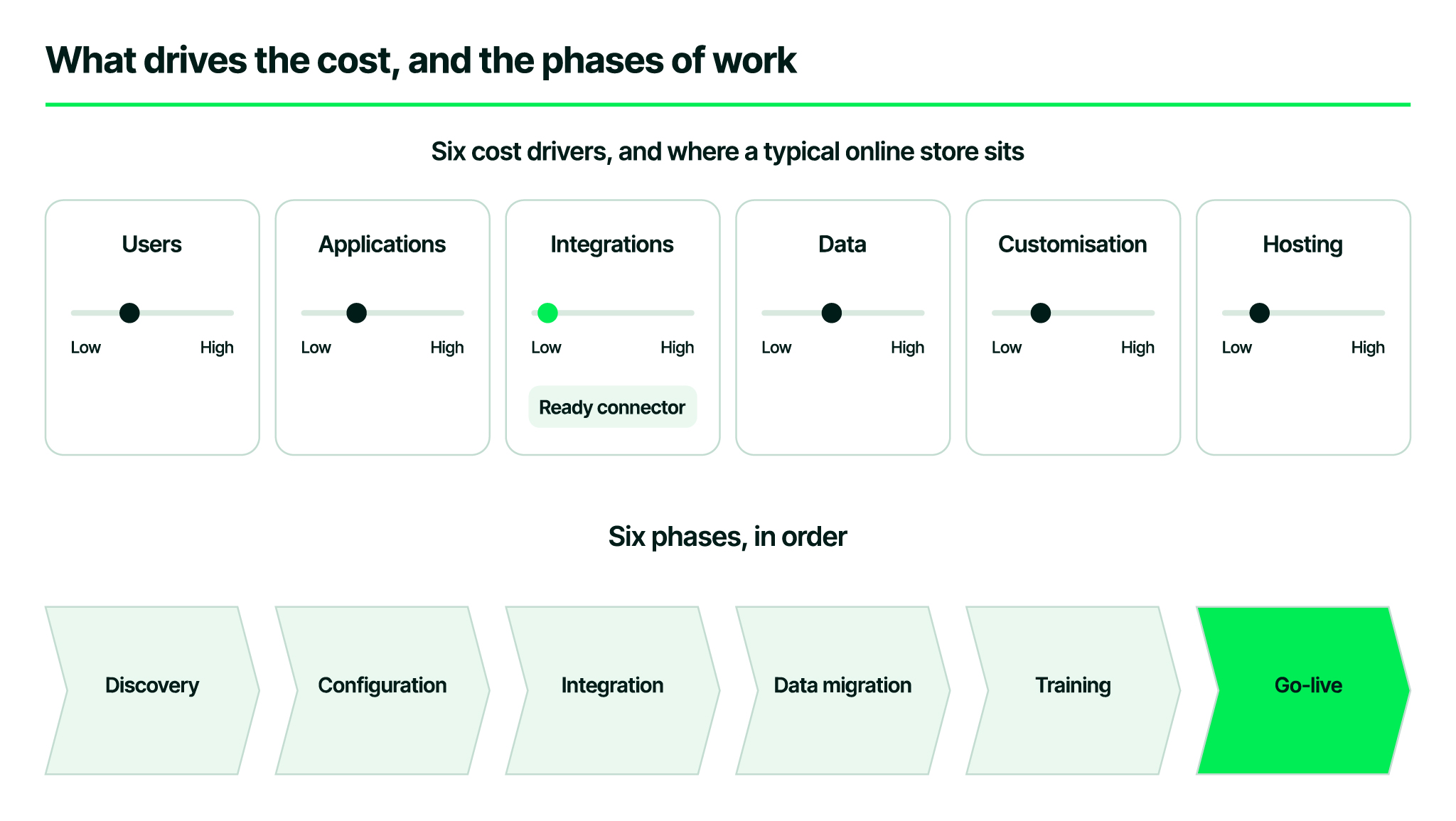
The cost of an ERP implementation in Saudi Arabia is set by six things: the number of users, the applications you switch on, the integrations (store, payment gateways, couriers, POS), how much data you migrate and how clean it is, how much you customise beyond standard workflows, and hosting. A store with a ready connector for its platform starts from the easier end, because the hardest integration already exists. The only reliable number is a scoped quote after a discovery session.
Timeline follows the same logic. Every project passes through discovery, configuration, integration, data migration, training and go-live. A single-company store with standard workflows moves through them quickly; a multi-branch operation with manufacturing and custom pricing takes longer. What stretches a project is almost never the software. It is unclean product data, undecided processes, and a team that has not been given time to test.
How does an ERP implementation run?
- Discovery: map the current path of an order from checkout to bank statement, list every system it touches, and agree what done looks like.
- Configuration: set up companies, warehouses, the chart of accounts, VAT, product categories and price lists before any data moves.
- Integration: connect the store, the payment gateways and the couriers, then run test orders end to end, including a refund, a partial shipment and a cash-on-delivery order.
- Data migration: products first, then customers, then open orders and opening balances. Clean the product file before migrating. It is the cheapest hour in the whole project.
- Training: by role, on your own data, with real orders. The warehouse team, the accountant and the store manager each need a different two hours.
- Go-live and the first close: run the first month end with the partner on call, then compare what the reports say against what the team expected.
Five mistakes we see Saudi stores make
- Replacing the storefront. Moving customers off their platform onto an ERP web shop to 'have everything in one system'. The platform is where your customers, your payment methods and your shipping contracts already are. Keep it and connect it.
- Buying on price alone. The cheapest system with no connector costs more in the first year than a mid-band system with one.
- Migrating dirty data. Duplicate codes, inconsistent variant names and missing barcodes become permanent the moment they enter the ERP.
- Skipping the test orders. An integration that never processed a refund, a partial shipment and a cash-on-delivery order in testing will process them wrongly in production.
- Treating go-live as the end. The first monthly close is the real acceptance test.
Frequently asked questions
Does my online store need an ERP?
Not by default. It needs one when the platform dashboard is no longer the single source of truth: more than one warehouse or branch, more than one sales channel, several hundred orders a month, wholesale customers, products you make yourself, or a monthly close that takes days. Below those lines, an accounting app connected to your store is enough.
What is the difference between an ERP and accounting software?
Accounting software records money. An ERP also records the operations that produce it, such as stock movements, purchase orders, manufacturing, deliveries and customers, and then does the accounting on top in the same database. Accounting software is one application inside an ERP.
Should I use the ERP's built-in web shop instead of my current platform?
No. Your platform carries the Saudi payment methods, the shipping contracts, the marketplace connections and the customer trust that a generic built-in shop does not. The right setup keeps the storefront where it is and connects it to the system behind.
How much does an ERP implementation cost in Saudi Arabia?
It depends on users, applications, integrations, data volume, customisation and hosting. A store with a ready connector starts from the easier end, because the hardest integration already exists. A scoped quote after a discovery session is the only reliable number.
How long does it take?
It depends on scope. Every project passes through discovery, configuration, integration, data migration, training and go-live. Clean data and a team with time to test shorten it more than anything else.
Does the ERP handle ZATCA e-invoicing?
Odoo's Saudi localisation covers Phase 2 clearance and reporting. With the store connected, each order becomes a compliant invoice inside the ERP, matched to the order and the payment. Check your own wave and deadline on the ZATCA e-invoicing pages.
Can one ERP run the online store, a branch and wholesale together?
Yes, and it is the main reason stores move to one. A single stock pool serves all three, with rules for which channel gets the last unit, and one monthly close covers them all.
Do I need a partner, or can I set up Odoo myself?
A small store can start on standard Odoo alone. Once a store connector, e-invoicing, multi-location stock or a data migration is involved, an Odoo-certified Saudi partner shortens the project and carries the first monthly close with you.
Which platform do you sell on?
You sell on Salla
Read the guide for Salla merchants: what changes when you connect your Salla store to Odoo, what syncs in each direction, and how the integration app installs.
You sell on Zid
Read the guide for Zid merchants: what changes when you connect your Zid store to Odoo, what syncs in each direction, and how the integration is set up.
Not sure which side of the seven signals you are on?
Book a free consultation with Naqlah. We map your current order flow in one session and tell you plainly whether you need an ERP now, later, or not at all.